Top Combo Picks
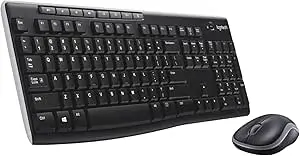
1) Logitech MK270 Wireless Keyboard & Mouse — Best Budget Combo
If you want something that just works, it’s hard to beat the MK270 for value and reliability. Expect a full-size keyboard, a compact mouse, and long battery life with a simple 2.4GHz USB receiver. ? Read our Logitech MK270 review ? Check price / availability- Connection: 2.4GHz USB nano receiver (plug-and-play)
- Why we like it: Comfortable full-size keyboard, dependable wireless, strong battery life
- Best for: Home office, students, anyone who wants set-and-forget simplicity
2) Logitech “Everyday” Kit — M185 + Simple Keyboard
Prefer a classic, no-nonsense experience? The Logitech M185 mouse paired with a simple Logitech keyboard is an easy daily driver that focuses on comfort and longevity. ?️ Read our Logitech M185 review ? Why we recommend the M185 keyboard & mouse kit ? How to replace the M185 battery- Connection: 2.4GHz USB nano receiver
- Why we like it: Lightweight, ambidextrous mouse with proven reliability
- Best for: Everyday office tasks, basic productivity
Great Standalone Mouse Alternatives
If you already own a keyboard you love, pairing it with a solid mouse can be smarter than buying a full combo.Logitech M240 Silent Bluetooth — Quiet & Dongle-Free
The M240 Silent Bluetooth cuts the cable clutter and reduces click noise—ideal for shared spaces and travel. ? Read our M240 overview ? Check price / availability- Connection: Bluetooth (no USB receiver required)
- Why we like it: Quiet clicks, travel-friendly, long battery life
- Best for: Coffee shops, open-plan offices, hybrid workers
Logitech M185 — Proven Budget Favourite
A dependable classic with smooth tracking and excellent battery life. Perfect if you want a fuss-free mouse that lasts. ? Read our full M185 reviewHow to Choose the Right Keyboard & Mouse
- Connection type: 2.4GHz USB is plug-and-play; Bluetooth frees up the USB port and is better for modern laptops/tablets.
- Noise level: “Silent” mice reduce click noise—great for shared spaces.
- Battery life: Look for 12–24 months to minimise maintenance; keep spares handy.
- Ergonomics: Full-size keyboard for long typing sessions; ambidextrous or sculpted mouse based on preference.
- Value: Combos often cost less than buying separately; check current bundle deals.
FAQ
Is a combo better than buying a keyboard and mouse separately?
For most users, yes—combos are cheaper and guaranteed to work together from one receiver/app. If you already own a premium keyboard, adding a standalone mouse (e.g., M240 Silent Bluetooth) can be smarter.What’s the best budget combo?
The Logitech MK270 remains our favourite for value, simplicity and battery life.How do I fix connection issues?
Replace batteries, re-seat the USB receiver, move closer to the receiver, or re-pair Bluetooth. See our quick guide: M185 battery replacement (plus general tips in our troubleshooting articles).Next: Compare two popular budget mice head-to-head in our upcoming guide: Logitech M185 vs M240 — Which Should You Choose?
Related Posts
- Logitech M185 Review – Best Budget Wireless Mouse 2025
- Logitech M185 vs M240 – Which Should You Buy?
- Logitech M240 Silent Bluetooth Mouse – Full Review (2025)
- Logitech MK270 Review – Hassle Free, Just Works
- Logitech G305 Review (2025) – Best Wireless Gaming Mouse?
- Keyboard and Mouse Not Connecting? Quick Fixes (2025 Guide)