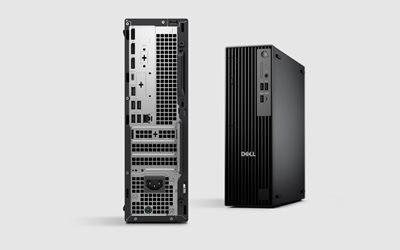
The Dell Pro Slim QCS1250 is Dell’s next-generation Small Form Factor (SFF) business desktop, engineered as a direct replacement for the older OptiPlex 3000, 5000, and 7000 series.
With improved thermals, enhanced power efficiency, and modern Intel/AMD processors, the QCS1250 is built for businesses needing reliable, long-lifecycle desktop hardware without the footprint of traditional tower PCs.
I rate this model as an excellent replacement choice for any organisation currently running pre-2022 OptiPlex units or planning a Windows 10 retirement hardware refresh.
Key Business Advantages
1. Modern Processing Power
Available with current-generation Intel or AMD business CPUs, delivering:
- Faster application load times
- Smooth multitasking
- Stronger security and firmware support
- Improved long-term reliability
Perfect for:
- Office applications
- Web-based business systems
- Accounting software
- Email, Teams, and communication platforms
- Multi-screen workloads
2. Compact & Professional “Pro Slim” Design
- Small footprint fits under monitors or behind displays
- Reduced heat and noise levels
- Tool-less chassis for easy maintenance
- Designed for corporate desks, kiosks, and hybrid workstations
3. Enhanced Security & IT Manageability
- TPM 2.0
- Secure Boot
- Dell BIOS protection features
- Optional SmartCard and facial-recognition modules
- Enterprise remote management support
These features ensure stable, secure, and manageable deployments across multiple offices or large user bases.
4. Modern Connectivity Options
Typical QCS1250 configurations include:
- USB-C and multiple USB-A ports
- DisplayPort and/or HDMI (varies by SKU)
- Optional Wi-Fi 6E
- RJ45 Gigabit Ethernet
- Dual SSD support (NVMe)
This provides flexibility for:
- Dual and triple monitor setups
- Docking station environments
- Hybrid users working between home and office
Recommended Configuration Options
Below are three well-balanced configurations depending on workload.
Option A: Standard Office Build
Best for: Email, spreadsheets, Teams, accounting, CRM, web apps.
Recommended Spec:
- Intel Core i5 or AMD Ryzen 5
- 16GB DDR5 RAM
- 256GB or 512GB NVMe SSD
- Integrated graphics
- Windows 11 Pro
Why this works:
Fast, efficient, and balanced for the majority of business users. Long lifecycle and low support overhead.
Option B: Business Power User Build
Best for: Heavy multitasking, large workbooks, multi-window workflows, dual-monitor setups.
Recommended Spec:
- Intel Core i7 or AMD Ryzen 7
- 32GB DDR5 RAM
- 512GB or 1TB NVMe SSD
- Integrated graphics
- Windows 11 Pro
Why this works:
Future-proofed for demanding workloads and users that run multiple business systems simultaneously.
Option C: Specialist / Developer / Creative Build
Best for: Developers, CAD-lite usage, analysts, users needing above-average performance.
Recommended Spec:
- Intel Core i7 or AMD Ryzen 7
- 32GB–64GB DDR5 RAM
- 1TB NVMe SSD
- Optional low-profile discrete GPU
- Windows 11 Pro
Why this works:
Handles high-performance tasks without requiring a full-tower workstation.
What the QCS1250 Replaces
The QCS1250 is the intended upgrade path for older Dell SFF models, including:
Replaces:
- OptiPlex 3000 Series SFF
- OptiPlex 5000 Series SFF
- OptiPlex 7000 Series SFF
- Older 3070 / 3080 / 5080 / 7080 desktops
Reasons to Upgrade
- Faster performance (CPU + DDR5 memory)
- Improved thermal efficiency
- Smaller footprint
- Stronger security compliance
- Longer manufacturer support lifecycle
- Lower power usage
- Designed for Windows 11
Professional Rating
9.2 / 10 – Strongly recommended for business environments.
Stable, compact, energy-efficient, and easily serviceable. Ideal for office refresh cycles, hybrid work, and organisations standardising on a consistent platform.
Related Posts
- Intel Core i7-14700K: Tactical Threads and Efficiency
- Ryzen 7 9800X3D: Sublime Boost, Unbreakable Core
- The Complete Guide to Servers and Infrastructure
- Best Servers for Small Business in 2025
- Cloud Computing vs On-Premises: Which is Best?
- SATA vs SSD: How One Upgrade Transforms Your Workflow
Thermal Performance and Office Suitability
One of the QCS1250’s key strengths over traditional tower units is its engineered thermal design. The compact chassis uses optimised airflow ducting and strategically positioned heatsinks to manage modern processor heat output without the need for large or loud cooling fans. This matters significantly if you’re deploying workstations into shared office environments.
For open-plan offices, call centres, and reception areas, the QCS1250 is substantially quieter than equivalent tower desktops. Full-load noise levels typically range from 32–38 dB(A), roughly equivalent to normal office conversation. Older OptiPlex towers often reach 45–52 dB(A) under similar load—a noticeable difference across a room of 20+ workstations. If you’re upgrading legacy hardware in a quiet workspace, the reduction in fan noise alone often improves staff comfort and concentration.
Power consumption directly affects both your electricity bills and heat output. The QCS1250 draws approximately 35–55 watts at idle and 65–120 watts under typical office load, depending on configuration. Compare this to older tower desktops (often 80–150 watts idle), and the per-unit annual saving is typically £15–25 in energy costs alone. Across 100 workstations, that’s a genuine operational saving worth considering in your total cost of ownership analysis.
Thermal management also means the QCS1250 is suitable for wider deployment scenarios:
- Open-plan offices: Low noise and heat output don’t require additional ventilation or noise-dampening measures.
- Kiosk and reception areas: Fits neatly behind display panels or counters without creating thermal hot spots.
- Multi-workstation clusters: Reliable thermals mean you can deploy side-by-side without heat accumulation.
- Hot-desking environments: The compact design works well in hot-desk rotations with shared monitor and docking arrangements.
One caveat: if your organisation frequently runs sustained high-performance workloads (heavy video encoding, 3D rendering, or scientific computing), the integrated cooling is optimised for typical office use. For continuous 8-hour demanding tasks, consider the Specialist build with optional discrete GPU, which includes slightly more robust thermal provisioning.
Related articles: HP Pro 290 G9 Desktop PC Review