The Samsung Galaxy Book 5 Ultra (2026) is a premium Windows ultrabook designed for users who want portability, performance, and one of the best laptop displays available. Built around a vivid AMOLED screen and modern AI-accelerated processors, it fits perfectly into the wider Samsung ecosystem.
This model is aimed at professionals, travellers, and creators who prioritise screen quality, battery life, and a sleek, lightweight design without moving into bulky workstation territory.
⭐ Quick Verdict
A premium, ultra-portable Windows laptop with a class-leading AMOLED display, strong everyday performance, and excellent battery life — ideal for productivity-focused users in 2026.
Key Specifications
| Component | Details |
|---|---|
| CPU | Intel Core Ultra 7 / Ultra 9 |
| GPU | Intel Arc Integrated Graphics |
| Display | 16″ 3K AMOLED (120Hz) |
| RAM | 16GB / 32GB LPDDR5X |
| Storage | 512GB – 2TB NVMe SSD |
| Battery | 14–20 hours real-world |
| Weight | ~1.8 kg |
| Ports | 2× USB-C (Thunderbolt), USB-A, HDMI, microSD |
| OS | Windows 11 AI Edition |
Pros
- Outstanding AMOLED display (brightness, contrast, colour accuracy)
- Premium, slim aluminium chassis
- Lightweight for a 16-inch laptop
- Strong battery life for productivity use
- Excellent keyboard and large trackpad
- Seamless integration with Samsung phones and tablets
Cons
- Integrated graphics limit gaming performance
- Premium price point
- Speakers are good but not class-leading
- Limited upgrade options
Best For
✔ Business professionals
✔ Home office and productivity users
✔ Travellers needing a large screen in a light chassis
✔ Designers and content consumers
✔ Samsung ecosystem users
✔ Anyone wanting a premium Windows alternative to a MacBook Pro (non-gaming)
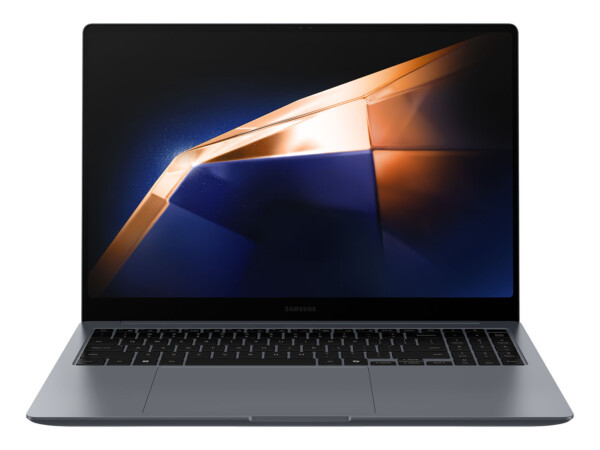
Samsung Galaxy Book 5 Ultra
The Samsung Galaxy Book 5 Ultra is a premium Windows ultrabook designed for users who want portability, performance, and one of the best laptop displays available.
Buy Now →Related Laptop Guides
- Best Premium Laptops 2026
- Best AMOLED Laptops 2026
- Best Laptops for Business 2026
- Best Lightweight 16-Inch Laptops
❓ Frequently Asked Questions
Is the Galaxy Book 5 Ultra good for creative work?
Yes — it’s excellent for photo editing, design, and general creative tasks thanks to the AMOLED display, though heavy 3D or video rendering benefits from a dedicated GPU.
How does the AMOLED display compare to OLED or Mini-LED?
Samsung’s AMOLED panels are among the best available, offering deep blacks, vibrant colours, and excellent brightness with lower power consumption.
Is this laptop good for gaming?
Only light gaming. Integrated graphics are not intended for modern AAA titles.
Does it work well with Samsung phones?
Yes — features like Quick Share, second-screen support, and cross-device copy/paste work seamlessly.
Related Posts
- Best Laptops 2026 – The Buyer’s Guide
- MSI Prestige AI Evo – Full Review and Buyer’s Guide
- ASUS ROG Zephyrus G16 (2026 Edition) – Full Review
- Dell XPS 15 (2026 Edition) – Full Review and Buyer’s Guide
- MacBook Pro M5 (2026 Edition) – Full Review and Buyer’s Guide
- Best Gaming Laptops In 2025
How it Compares to Key Alternatives
The Galaxy Book 5 Ultra occupies the premium Windows ultrabook space, putting it in direct competition with several established players. Understanding how it compares helps you make an informed decision based on your priorities.
vs MacBook Air M3 (15-inch)
The MacBook Air offers similar portability and battery life, but the Galaxy Book 5 Ultra pulls ahead with its superior display technology. The AMOLED screen outshines MacBook’s Liquid Retina LCD in brightness, colour depth, and contrast. However, MacBook Air runs macOS, which may be preferable if you’re already in the Apple ecosystem. Price is roughly equivalent, though the Galaxy often offers better specs per pound sterling.
vs ThinkPad X1 Carbon (14-inch)
Lenovo’s business-focused ultrabook is lighter and offers superior build quality and keyboard feel. However, the Galaxy Book 5 Ultra’s AMOLED display is significantly better for creative work and content consumption. The ThinkPad is more durable for business travel, whilst the Samsung prioritises aesthetic design. The Galaxy Book is also typically cheaper.
vs Dell XPS 13/14
Dell’s XPS range is the closest Windows competitor. The XPS 13 is smaller and lighter, whilst the XPS 14 offers a larger screen. Both use excellent OLED displays, though the Galaxy’s AMOLED panel offers slightly better peak brightness. Samsung’s integration advantages (Quick Share, Samsung ecosystem) don’t exist on Dell, but the XPS has better thermals and quieter operation under load. The Galaxy Book 5 Ultra typically offers better value for money in the UK market.
For creators prioritising display quality and ecosystem integration, the Galaxy Book 5 Ultra wins. For business users requiring maximum durability, the ThinkPad is stronger. For those locked into Apple’s ecosystem, the MacBook remains the default choice. The Samsung shines as an excellent all-rounder — outperforming on display and value, with only modest compromises elsewhere.