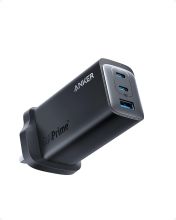
The Anker 737 GaNPrime is a powerful 120W charger, but to get the most out of it you need the right accessories — particularly cables. Many standard USB-C cables cannot handle 100W+ charging, which limits performance significantly. Here are the best accessories to pair with your 737.
Cables
The cable is the most important accessory for a high-wattage charger. For the USB-C1 and C2 ports on the 737 to deliver their full output, you need a cable rated for at least 100W — ideally 240W for future-proofing.
Anker PowerLine III Flow USB-C to USB-C (100W)
The obvious first choice. Anker’s own cable is designed to work perfectly with the 737, supports 100W PD, and is built with a soft braided finish that resists tangling. Available in 1m and 1.8m lengths. Good all-round cable for laptops and phones.
Ugreen 240W USB-C Cable
If you want a single cable that works with current and future high-wattage devices, Ugreen’s 240W cable is excellent. It supports USB4 data transfer as well as 240W charging (USB PD 3.1), has a sturdy braided sleeve, and aluminium connectors. Works with the 737 up to its 100W limit.
Baseus Minimalist USB-C Cable (100W)
A budget-friendly alternative that still supports 100W PD. Well reviewed for durability and available in longer lengths if you need to charge from across a desk.
What to avoid
Avoid cheap, unbranded USB-C cables — many are only rated for 60W or even 5V/3A (15W) despite appearing identical to high-wattage cables. Using an under-rated cable with a 100W charger is safe (the cable limits the output automatically), but you will not get anywhere near the advertised charging speeds.
Travel Adapters
The Anker 737 uses a standard UK three-pin plug. If you travel internationally, a compact travel adapter makes it far more versatile.
Zendure Passport III
A well-built all-in-one travel adapter that works in over 200 countries. Compact enough to stay on the 737’s plug without sagging, and includes two USB-A passthrough ports so you can charge smaller devices directly from the adapter itself.
Anker PowerExtend USB-C 3 Capsule
If you need a short extension lead rather than a travel adapter, Anker’s own mini extension is a clean solution. Three outlets, compact design, and it pairs well with the 737 when you only have one wall socket available at a hotel or desk.
Protective Cases and Storage
The 737 is large enough to be a target for scratches in a bag. A case protects both the charger and anything it is packed alongside.
Tomtoc Hard Shell Charger Case
A zippered hard-shell case with internal mesh pockets for cables and adapters. Designed for GaN chargers in this size range. Keeps everything organised and protected in transit.
Anker Carry-On Travel Pouch
Anker’s own travel pouch is a softer option — not hard-shell but padded and compact. Fits the 737, a short cable, and a few adapters. Good for day bags.
Cable Management
With four ports in use, cable clutter on a desk becomes an issue quickly. A few simple accessories help:
- Cable clips — adhesive clips on the underside of a desk keep cables routed cleanly
- Short cable (30cm) — for devices that sit next to the charger, a short cable reduces desk clutter significantly compared to a 1m cable
- Cable ties or velcro straps — for keeping the 737’s own cable tidy when packed
Is the Included Cable Good Enough?
The Anker 737 comes with a 1.5m USB-C cable in the box rated for 100W. For most users this is perfectly adequate. The main reason to buy an additional cable is if you need a different length, a second cable for a second device, or a 240W-rated cable for future-proofing when higher-wattage devices become more common.
Related Guides
- Anker 737 Review — Is It Worth Buying?
- Anker 737 Troubleshooting Guide
- Best USB-C Chargers for MacBook Pro