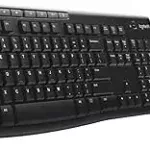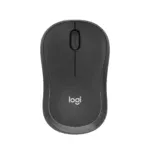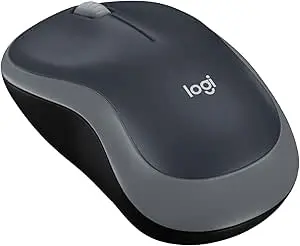
Logitech M185 vs M240, When it comes to affordable, reliable wireless mice, Logitech has two popular champions: the Logitech M185 and the Logitech M240 Silent Bluetooth. Both are compact, dependable, and budget-friendly—but which one is right for you? Let’s compare them head-to-head so you can make the best choice in 2025.
Logitech M185 Overview
The Logitech M185 is a classic plug-and-play mouse that has stood the test of time. Using a 2.4GHz USB nano receiver, it offers reliable performance with up to 12 months of battery life.
- Connection: USB nano receiver (2.4GHz)
- Battery life: Up to 12 months
- Design: Simple, ambidextrous shape
- Best for: Everyday office and home use
? View the Logitech M185 product page
Logitech M240 Silent Bluetooth Overview
The newer Logitech M240 Silent Bluetooth brings a quieter, dongle-free experience. It’s compact, travel-friendly, and boasts longer battery life.
- Connection: Bluetooth (no receiver needed)
- Battery life: Up to 18 months
- Noise level: SilentTouch™ clicks (90% quieter)
- Best for: Students, travellers, and shared workspaces
? View the Logitech M240 product page
Side-by-Side Comparison
<!– wp:affiliatex/versus-line {"block_id":"block-945acfc8-d00e-4d4d-8e0e-b013e4e89243","versusTable":[{"versusTitle":"Feature","versusSubTitle":"","versusValue1":"Logitech M185","versusValue2":"Logitech M240 Silent Bluetooth"},{"versusTitle":"Connection“,”versusSubTitle”:””,”versusValue1″:”2.4GHz USB nano receiver”,”versusValue2″:”Bluetooth (dongle-free)”},{“versusTitle”:”Battery Life“,”versusSubTitle”:””,”versusValue1″:”Up to 12 months”,”versusValue2″:”Up to 18 months”},{“versusTitle”:”Noise Level“,”versusSubTitle”:””,”versusValue1″:”Standard clicks”,”versusValue2″:”SilentTouch™ (90% quieter)”},{“versusTitle”:”Design“,”versusSubTitle”:””,”versusValue1″:”Ambidextrous, compact”,”versusValue2″:”Compact, sleek, modern”},{“versusTitle”:”Best Use Case“,”versusSubTitle”:””,”versusValue1″:”Everyday budget office/home use”,”versusValue2″:”Quiet offices, libraries, travel”}]} /–>
Logitech M185
“,”imageUrl”:”https://www.serverman.co.uk/wp-content/uploads/2025/08/logitech-m185.jpg”,”ribbonText”:””,”imageId”:2537,”imageAlt”:”logitech m185″,”price”:””,”rating”:4,”button”:”Buy Now”,”buttonURL”:”https://www.amazon.co.uk/dp/B00552K0GM?tag=serverman-21″,”btnRelNoFollow”:false,”btnRelSponsored”:false,”btnOpenInNewTab”:true,”btnDownload”:false},{“title”:”Logitech M240 “,”imageUrl”:”https://www.serverman.co.uk/wp-content/uploads/2025/08/logitech-m240.jpg”,”ribbonText”:””,”imageId”:2533,”imageAlt”:””,”price”:””,”rating”:5,”button”:”Buy Now”,”buttonURL”:”https://www.amazon.co.uk/dp/B07W6HCFYX?tag=serverman-21″,”btnRelNoFollow”:false,”btnRelSponsored”:false,”btnOpenInNewTab”:true,”btnDownload”:false}],”comparisonSpecs”:[]} /–>
Which One Should You Buy?
If you want a simple, no-frills wireless mouse that just works, the M185 remains a fantastic budget choice.
If you value quiet clicks, longer battery life, and dongle-free convenience, the M240 is the smarter option.
Verdict
Both are excellent budget mice. For around the same price, the M240 Silent Bluetooth edges ahead thanks to its quieter clicks and longer battery life—making it our recommended pick for most users in 2025.
Related Reading
- Logitech MK270 Keyboard & Mouse Review
- Why I Recommend the M185 Kit
- Best Keyboard & Mouse Combos 2025 Guide
Related Posts
- Logitech M185 Review – Best Budget Wireless Mouse 2025
- The Reliable and Trusted Logitech M240 Bluetooth Mouse
- Logitech M240 Silent Bluetooth Mouse – Full Review (2025)
- Why I Recommend the Logitech M185 Keyboard Mouse Kit
- Best Keyboard and Mouse Combos (2025 Guide)
- How to Replace the Battery in a Logitech M185 Wireless Mouse
Compatibility, Comfort & Long-Term Use
Beyond headline specifications, real-world comfort and device compatibility matter significantly when you’re using a mouse for eight hours daily.
Device Compatibility & USB Ports
The M185’s USB nano receiver requires a dedicated USB-A port—increasingly scarce on modern laptops and MacBooks. If your machine has limited ports, you’ll need a USB-C adapter, adding cable clutter. The M240 connects via Bluetooth and works seamlessly with any device: Windows PCs, MacBooks, iPads, and even Android tablets. If you’re regularly switching between multiple devices or working on a USB-C–only laptop, the M240’s dongle-free approach saves frustration and keeps your desk tidy.
Hand Size & Ergonomics
The M185’s larger, ambidextrous profile suits medium to large hands and works equally well for claw, palm, and finger-grip styles. The M240’s more compact, contoured design better suits smaller hands or those who prefer a sleeker grip. Neither offers substantial palm rest padding or wrist support, so anyone experiencing hand fatigue should consider upgrading to a dedicated ergonomic mouse. For typical eight-hour office days, both are reasonably comfortable, though prolonged use without wrist support may cause strain for susceptible users.
Real-World Performance & Tracking
Both mice offer reliable tracking up to approximately 10–12 metres. The M185’s USB receiver can occasionally suffer interference in crowded wireless environments (open-plan offices, busy Wi-Fi areas), whereas Bluetooth on the M240 is generally more stable. Neither suits gaming—expect approximately 100ms latency on both—but for spreadsheets, documents, and web browsing, tracking is responsive and lag-free on both models.
Battery & Ongoing Costs
The M240’s 18-month battery life means fewer charging interruptions. Importantly, neither includes a charging cable in the box. The M240 uses standard USB-C (readily available at any supermarket), whilst the M185 requires AA batteries you must purchase separately. Over a three-year ownership period, battery costs may add £10–15 to the M185’s true cost of ownership, narrowing the price gap between the two models.
Connectivity & Compatibility
Choosing between USB and Bluetooth isn’t just about convenience—it affects which devices you can actually use each mouse with.
The M185’s USB Receiver works with any device that has a free USB-A port: laptops, desktops, and even older machines. There’s no setup required—plug in the nano receiver and it pairs instantly. The downside is that it consumes a USB port, which can be inconvenient on laptops with limited ports. If your machine has USB ports filled with other peripherals (keyboard receiver, printer dongle, security keys), you may need a USB hub.
The M240’s Bluetooth requires Bluetooth 4.0 or newer, which covers most modern laptops, tablets, and smartphones made after 2012. Setup is straightforward: hold the pairing button until the LED blinks, then select “Logitech M240” in your device’s Bluetooth settings. The pairing process takes under a minute, and the mouse remembers multiple devices, allowing you to switch between a laptop and tablet with a reconnect button on the underside.
However, Bluetooth connectivity can occasionally suffer from interference in busy office environments with many wireless devices. If you’re in a congested 2.4GHz spectrum (shared with Wi-Fi, microwaves, cordless phones), the M185’s dedicated USB frequency may offer more stability. For typical home and office use, the M240’s Bluetooth performs reliably.
Driver and Software Considerations: Neither mouse requires drivers on Windows, macOS, or Linux—both work immediately as plug-and-play devices. Logitech’s optional Options+ software (Windows/Mac) adds customisable buttons and wireless settings, but this is entirely optional.
Best for Your Setup: Choose the M185 if you have limited Bluetooth capability, prefer not to rely on wireless pairing, or need guaranteed compatibility with older systems. Choose the M240 if you’re using modern devices, prefer a clutter-free desk, or frequently switch between multiple machines.