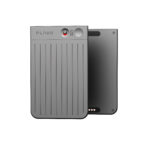
Apps like Google Recorder, Otter.ai, and Notepin already offer AI transcription on your smartphone. So why spend money on a device like Plaud Note? In this comparison we’ll weigh up the pros and cons, from reliability to workflow speed, and decide if dedicated hardware is worth it.
Quick Comparison
| Factor | Plaud Note | Phone Apps |
|---|---|---|
| Ease of Use | One-tap button, clips to clothing, no screen needed | Requires unlocking phone, finding app, starting recording |
| Reliability | Dedicated hardware with dual mics + VCS sensor | Depends on mic quality and background noise |
| Transcription | AI in companion app, summaries + notes | Varies: Google Recorder (good), Otter.ai (subscription) |
| Battery Impact | Own 400 mAh battery, ~30h recording | Uses phone battery; long sessions can drain quickly |
| Discretion | Small card-sized, LED indicator only | Holding/using phone is more obvious |
| Price | £90–£120 hardware + optional subscription | Free apps or subscription only |
When Plaud Note Makes Sense
- Frequent recorder: journalists, students, consultants capturing hours of speech weekly
- Need reliability: one-tap start, less chance of missed recordings
- Prefer discreet device: looks professional, no need to fiddle with phone mid-meeting
When a Phone App is Enough
- Occasional user: only record a few lectures or meetings
- Budget-conscious: already happy with free Google Recorder or limited Otter.ai plan
- Don’t want extra device: prefer all-in-one phone workflow
Plaud Note Pros
- Dedicated hardware = fewer missed recordings
- AI summaries & speaker labels
- 30 hours continuous recording
- Discreet, portable, professional look
Phone App Pros
- Free or low subscription cost
- No extra device to carry
- Instant sync to cloud (depending on app)
Verdict
If you record occasionally, a good app like Google Recorder or Otter.ai is fine. But if you’re a student, journalist, or business professional who records every week, the Plaud Note’s reliability and AI workflow will save you hours. That alone makes it worth the investment.
Plaud Note AI Voice Recorder Review (2025): Is It Worth It?
Plaud Note Setup & Troubleshooting Guide (2025)
Related Posts
- Plaud Note AI Voice Recorder Review (2025)
- 5 Ways to Use the Plaud Note AI Voice Recorder in 2025
- Plaud Note Accessories & Subscriptions (2025 Guide)
- Plaud Note Setup & Troubleshooting Guide (2025)
- Best AI Voice Recorders in 2025
Transcription Quality & Accuracy
Both Plaud Note and phone apps use AI transcription, but accuracy varies significantly. Understanding what to expect helps you avoid frustration and choose the right tool for your situation.
Plaud Note’s transcription relies on its companion app’s AI, which handles speech-to-text, summaries, and speaker labels. The device’s dual microphones and VCS (Voice Clarity Sensor) capture clearer audio, meaning fewer background noises interfere with transcription. Most users report 85–95% accuracy in quiet environments. In noisy settings (office chatter, traffic), accuracy typically drops to 70–80%, though still better than phone-based recording from a distance.
Phone apps vary widely in accuracy:
- Google Recorder — excellent accuracy (90%+) in clear audio; struggles with technical jargon and heavy accents unless specifically trained
- Otter.ai — consistently strong (85–90%); better at handling industry-specific vocabulary with premium plans; slower processing on free tier
- Other apps — quality ranges from 75% to 85%, depending heavily on microphone quality and ambient noise level
The critical advantage of Plaud Note: source audio quality. Because the device sits near your mouth (clipped to clothing), it captures your voice more clearly than a phone microphone held metres away or left on a table. This translates to fewer transcription errors, especially in group settings, meetings, or busy environments.
However, phone apps catch up in quiet, controlled spaces. If you’re recording lectures in silent rooms, one-on-one interviews, or podcasts, Google Recorder or Otter.ai deliver comparable results without requiring hardware investment.
For technical or specialist content — coding reviews, medical discussions, legal terminology — Otter.ai’s premium plan has an edge because it learns domain-specific language. Plaud Note’s summaries are more general-purpose.
The bottom line: invest in Plaud Note if accuracy in unpredictable, noisy environments is crucial to your work. Stick with phone apps if your recordings happen in controlled settings or if you need specialist vocabulary handling.
Privacy, Data Security & Compliance
If you’re recording client calls, patient interviews, or confidential business meetings, where your recordings are stored and who can access them matters considerably. This is where Plaud Note and phone apps differ significantly.
Plaud Note stores recordings on the device initially, then syncs them to its cloud server when you choose. The companion app uses encryption during transmission, but your transcripts live on Plaud’s servers. For most UK users, this is acceptable, though you should verify their data centre location and retention policies. If you’re subject to GDPR, HIPAA, or sector-specific regulations (legal, healthcare, financial services), you need to confirm whether Plaud’s infrastructure meets those requirements before recording sensitive material.
Phone apps vary wildly. Google Recorder keeps transcripts on your Google account; Otter.ai stores files on their servers. Free tiers may retain recordings longer for training purposes. If you handle regulated data, check each app’s privacy policy and data processing agreements explicitly.
Key privacy questions to ask yourself:
- Where are recordings and transcripts stored (local device, cloud, third-party server)?
- Is the connection encrypted during upload?
- Can you delete recordings permanently and immediately?
- Do you retain ownership of the content?
- Is the service GDPR-compliant or subject to UK data law?
- Does the provider use your data for AI training or analytics?
For journalists and consultants handling sensitive sources, keeping recordings local on your phone (without cloud sync) is the safest option, though it sacrifices convenience. Plaud Note’s local storage before sync gives you a brief window to decide whether to upload. If you deal with highly confidential material, neither option is ideal—consider a dedicated encrypted voice recorder without any cloud features.
Most casual users and students needn’t worry excessively, but professionals should review their organisation’s data protection policy before choosing. A five-minute check now prevents regulatory headaches later.