Synology vs QNAP: Which NAS Should You Buy in 2026?
If you have spent any time researching network-attached storage, you will have quickly landed on two names: Synology and QNAP. Between them, these two Taiwanese manufacturers dominate the consumer and SMB NAS market. Both make reliable, capable hardware — and yet they represent meaningfully different philosophies about what a NAS should be. Choosing between them is not simply a matter of picking the cheaper box or the one with the most drive bays. It comes down to what you actually want the device to do, how comfortable you are with complexity, and how much you value software polish over raw hardware capability.
This guide breaks down both brands in detail, compares them across the dimensions that matter most, and gives you specific model recommendations so you can make a confident buying decision in 2026.
Synology: Software First, Hardware Second
Synology’s approach is built around DiskStation Manager, or DSM — their proprietary operating system that runs on every NAS they make. DSM is widely regarded as the best NAS operating system available. It is polished, well-documented, and updated regularly with meaningful new features. If you have used other NAS operating systems and then switched to DSM, the difference is noticeable almost immediately: menus make sense, tasks that should be simple are simple, and edge cases are handled gracefully.
The broader Synology software ecosystem is genuinely impressive. Synology Photos provides a self-hosted alternative to Google Photos with face recognition, timeline views, and mobile apps. Synology Drive replicates much of what Google Drive or OneDrive offers, with desktop sync clients for Windows and macOS and a web interface. Surveillance Station handles IP camera management with support for hundreds of camera models. Hyper Backup manages backups to local drives, remote NAS units, or cloud destinations including Backblaze B2 and Amazon S3. Active Backup for Business allows agentless backup of Windows PCs and VMware virtual machines — and is included at no extra licence cost for Synology hardware owners, which represents significant value for small businesses.
Synology also builds its own RAID management layer, Synology Hybrid RAID (SHR), which is user-friendly and allows mixing drives of different sizes more efficiently than traditional RAID5 or RAID6. For most home users and small offices, SHR is the right default choice.
The trade-off is hardware. Synology has historically been conservative about the processors and RAM they ship in their consumer and prosumer units. A Synology DS423+ ships with an Intel Celeron J4125 quad-core — capable, but not cutting-edge. Drive expansion beyond the built-in bays requires Synology’s own expansion units. Third-party drives are technically supported but Synology maintains a hardware compatibility list, and some features (particularly certain pool health checks) will warn you if your drives are not on it. There is no Thunderbolt connectivity in the consumer range, and 10GbE is limited to certain Plus-tier and above models.
Support from Synology is generally well regarded. DSM receives security patches and feature updates for several years after product launch. Their online knowledge base is thorough. Community forums are active. Most users will never need to contact support directly because the documentation covers common problems well.
QNAP: Hardware Muscle and Power-User Flexibility
QNAP takes a different route. Where Synology makes hardware that serves its software, QNAP ships hardware that stands on its own merits — and they are willing to be aggressive about it. You will find QNAP units with Intel Core i5 and i7 processors, AMD Ryzen CPUs, 10GbE ports included as standard, Thunderbolt 4 connectivity, M.2 NVMe cache slots, and HDMI outputs for direct media playback. If raw specs are your primary yardstick, QNAP will almost always win at a comparable price point.
QNAP runs two operating systems depending on the hardware tier. Most consumer and prosumer units run QTS, which is mature and capable, though less refined than DSM. Higher-end units — particularly those with ECC RAM — run QuTS Hero, which is built on OpenZFS. For users who know what ZFS offers (copy-on-write data integrity, native snapshotting, self-healing against bitrot, flexible pool management), this is a significant differentiator. Synology does not offer ZFS on any of its consumer or SMB hardware.
The QNAP app ecosystem through their App Center covers most of the same ground as Synology’s — media servers, backup tools, surveillance, cloud sync, container management. QNAP’s Container Station provides Docker and LXC container support and is well implemented. Their Virtualization Station allows running full virtual machines directly on the NAS. These features exist on Synology too, but QNAP’s underlying hardware is generally better suited to running them without performance compromises.
Where QNAP loses ground is software reliability and security. QNAP has experienced a number of serious ransomware incidents over recent years — Qlocker in 2021 and DeadBolt in 2022 being the most high-profile — affecting a significant number of exposed units. While these attacks exploited known vulnerabilities, and Synology has had its own security issues, QNAP’s track record here is notably worse. QNAP’s own remote access service, myQNAPcloud, has been a vector in some attacks. Many experienced users recommend disabling direct internet exposure on QNAP devices entirely and using a VPN instead. That is sensible advice for any NAS, but it feels more urgent with QNAP.
The QTS interface is functional but feels dated in places compared to DSM. Third-party app support is broader in some respects — QNAP has a longer history of supporting community packages — but official first-party apps sometimes feel less polished than Synology’s equivalents.
Key Differences: A Direct Comparison
Software Quality
Synology’s DSM is the gold standard for NAS operating systems. It is consistent, well-maintained, and accessible to non-technical users. QTS is capable and feature-rich but requires more patience. QuTS Hero (QNAP’s ZFS variant) is excellent for power users who want ZFS integrity guarantees, but it adds complexity.
Hardware Specifications
QNAP wins at equivalent price points on raw hardware. More RAM, stronger CPUs, more connectivity options (10GbE, Thunderbolt, PCIe expansion slots on some models), and support for NVMe drives as primary storage on select units. Synology hardware is sufficient for most use cases but does not push boundaries.
Value for Money
This is context-dependent. Synology’s software is bundled and the Active Backup suite alone would cost hundreds of pounds per year on competing platforms. For software-heavy use cases, a Synology at a slightly higher hardware price may represent better overall value. For pure storage or home lab use where you will manage your own software stack, QNAP’s hardware value proposition is stronger.
App Ecosystems
Both have comprehensive app centres. Synology’s first-party apps (Photos, Drive, Surveillance Station, Hyper Backup) are more polished and tightly integrated. QNAP’s Container Station and virtualisation support are strong. If you want to self-host a wide range of services via Docker, QNAP’s hardware makes this more practical.
ZFS and Data Integrity
QNAP with QuTS Hero provides full OpenZFS. Synology uses Btrfs on compatible models, which offers snapshots and some copy-on-write protection, but it is not the same as ZFS in terms of scrubbing, error correction, and pool flexibility. For archival storage or any use case where long-term data integrity is paramount, QNAP’s ZFS support is genuinely meaningful.
Reliability and Security Track Record
Synology has a stronger recent security track record. Both brands should be kept off the public internet directly, but QNAP has suffered more high-profile mass-exploitation incidents. Neither should be treated as inherently safe when internet-exposed.
Support and Longevity
Synology typically supports hardware models with DSM updates for at least five to seven years. Their documentation is excellent. QNAP’s support lifecycle is less predictable and some older models have been end-of-lifed faster than users expected.
Comparison Table
| Dimension | Synology | QNAP |
|---|---|---|
| Operating System | DSM (mature, polished) | QTS / QuTS Hero (ZFS) |
| Software Ecosystem | Excellent first-party apps included free | Good — stronger on containers and VMs |
| Hardware Specs (per £) | Conservative but reliable | More RAM, CPU, connectivity |
| ZFS Support | No (Btrfs on compatible models) | Yes — QuTS Hero on ECC models |
| 10GbE Networking | Plus-tier and above only | Available on mid-range models |
| Thunderbolt | Not available (consumer range) | Available on select models |
| Security Track Record | Better (fewer mass exploits) | Weaker — several major incidents |
| Ease of Use | Excellent — suitable for beginners | Moderate — rewards experience |
| Long-Term Software Support | Strong (5–7+ years typical) | Variable — less predictable |
| Community and Documentation | Excellent | Good — strong home lab community |
Which Brand Should You Choose?
Choose Synology If…
- You want a NAS that works without fuss. DSM is accessible to non-technical users and does not require constant maintenance or forum-diving to get things working.
- You are a home user or small business. Synology’s first-party apps handle photos, file sync, backups, and surveillance well, with no additional licensing cost.
- You value software reliability over raw hardware specs. If the NAS will be running Synology Photos and Hyper Backup and not much else, the hardware is more than adequate.
- You want to back up PCs and servers without paying for licences. Active Backup for Business is a genuinely excellent tool and it is free for Synology hardware owners.
- Long-term support matters to you. Synology’s track record for keeping devices updated is stronger.
Choose QNAP If…
- You want ZFS. QuTS Hero on ECC-RAM-equipped QNAP units delivers full OpenZFS. If bitrot protection and flexible pool management are priorities, nothing in the Synology range matches this.
- You need 10GbE without paying a premium. QNAP includes 10GbE ports on mid-range models where Synology charges more or restricts it to higher tiers.
- You are building a home lab. Container Station, Virtualization Station, and the underlying hardware make QNAP a strong platform for running multiple services and VMs.
- You want Thunderbolt connectivity. QNAP offers Thunderbolt 4 on some models for direct connection to a Mac or workstation at full bandwidth.
- You are an experienced user comfortable managing network security, keeping firmware updated, and accepting some complexity in exchange for capability.
Recommended Models in 2026
Synology 2-Bay: DS223
The Synology DS223 is the current entry-level 2-bay for home users. It ships with a Realtek RTD1619B quad-core ARM processor and 2 GB RAM. This is enough for Synology Photos, Drive sync, media serving via Plex or Synology’s own media server, and Hyper Backup. It supports 1 GbE networking and has two M.2 NVMe slots for SSD caching (no drives included). At around £200–£220 for the diskless unit, it is a solid, low-power home NAS. It runs DSM and benefits from the full Synology software stack.
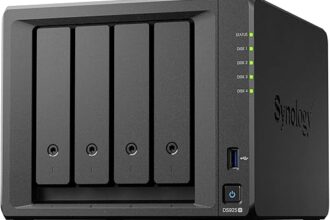
Synology 4-Bay: DS423+
The Synology DS423+ steps up to an Intel Celeron J4125 quad-core, 2 GB RAM (expandable to 6 GB), two M.2 NVMe slots, and a USB 3.2 Gen 1 front port. The Plus designation is important — it means transcoding support in Synology Photos and Video Station, and it unlocks Virtual Machine Manager. At around £430–£470, it is priced at a premium over QNAP equivalents but the software ecosystem justifies it for most business and prosumer buyers. This is the workhorse of Synology’s prosumer range and the one most small businesses should consider.
QNAP 2-Bay: TS-233
The QNAP TS-233 uses a Cortex-A55 quad-core processor and 2 GB RAM. At around £150–£170, it undercuts the DS223 noticeably. It runs QTS and handles basic NAS duties — file sharing, Plex, basic Docker containers — well enough for light home use. The hardware value is good, though the software experience is less polished than Synology at this tier. A sensible choice if budget is the priority and you are comfortable with QTS.
QNAP 4-Bay: TS-464
The QNAP TS-464 is where QNAP makes a genuinely compelling case. It runs an Intel Celeron N5105 quad-core (faster than the DS423+’s J4125 in multi-threaded workloads), ships with 8 GB DDR4 RAM as standard, includes two M.2 PCIe slots, and critically includes two 2.5 GbE ports — not just 1 GbE like many competing units at this price. At around £380–£420, it is cheaper than the DS423+ and offers more hardware for the money. If you are prepared to manage QTS and take responsibility for security hardening, the TS-464 delivers excellent value. This is the go-to recommendation for home lab users.
For power users who want ZFS on a 4-bay, the QNAP TS-464eU or the TS-h464 (QuTS Hero variant with ECC RAM) are worth considering, though at a higher price point.
What About Budget Alternatives? TerraMaster
No NAS comparison would be complete without mentioning TerraMaster. This Chinese manufacturer sells NAS units at significantly lower prices than either Synology or QNAP — a 4-bay unit can be found for under £200. The hardware specifications are often reasonable on paper.
The honest assessment: TerraMaster’s TOS operating system lags well behind both DSM and QTS in polish, features, and third-party app support. Their security update cadence has been inconsistent. Community support is limited compared to either major brand. For a secondary backup target or an offline archival device that never touches the internet, a TerraMaster can represent reasonable value. As a primary NAS for an active home or business environment, the software and support shortfalls are difficult to overlook. Most buyers are better served saving towards a Synology or QNAP entry model than opting for TerraMaster to save £50–£80.
Final Verdict
The Synology vs QNAP question does not have a single right answer, but it does have a right answer for you specifically.
Synology is the safer, smarter choice for the majority of buyers. DSM is genuinely excellent. The first-party app ecosystem covers most real-world use cases. Security and support are well managed. If you want a NAS that you can set up, trust, and not think about much — Synology is the recommendation.
QNAP is the right choice if you know what you are doing and want more for your money in hardware terms, particularly if ZFS, 10GbE, or Thunderbolt connectivity are important to your use case. The TS-464 in particular offers hardware that Synology simply does not match at the same price. Just be prepared to invest more time in security configuration and ongoing management.
Either way, buy a quality NAS, pair it with enterprise-grade drives (WD Red Plus or Seagate IronWolf are the standard recommendations), configure regular backups to a separate destination, and keep your firmware updated. The hardware brand matters less than those fundamentals.