
- Can Starlink Gen 3 Be Used as a Portable System?
- Mounting Starlink Gen 3 Portably: What Are the Options?
- FAQ: Using Starlink Gen 3 Portably
- Do I need a special Starlink plan for mobile use?
- Can I use the Gen 3 Dish without permanently mounting it?
- Is Starlink Gen 3 weather-resistant enough for portable use?
- Are there power requirements to be aware of?
- Will frequent movement affect signal quality?
- Final Thoughts
- ? Related Resources
Starlink Gen 3 is fast becoming a favourite among remote workers, campers, off-grid explorers, and mobile business users. But can it be used portably? Yes—with the right mounting setup and a few considerations. This post explores how users are taking their Gen 3 dish on the road, what mounts are available, and where to find more info.
Can Starlink Gen 3 Be Used as a Portable System?
Starlink Gen 3 was originally designed for fixed residential setups. However, with recent FCC approvals in 2024 and the introduction of new mobility mounts, it’s now legally usable on the move when paired with the correct service plan (like Starlink Mobile Priority).
Customers are now using Gen 3:
- On RVs and campervans
- For temporary events
- In off-grid cabins or allotments
- For mobile workstations or pop-up shops
⚠️ Note: Starlink Mobile Priority plans are required for full mobility support. Make sure you’re not violating service terms if moving locations frequently.
Mounting Starlink Gen 3 Portably: What Are the Options?
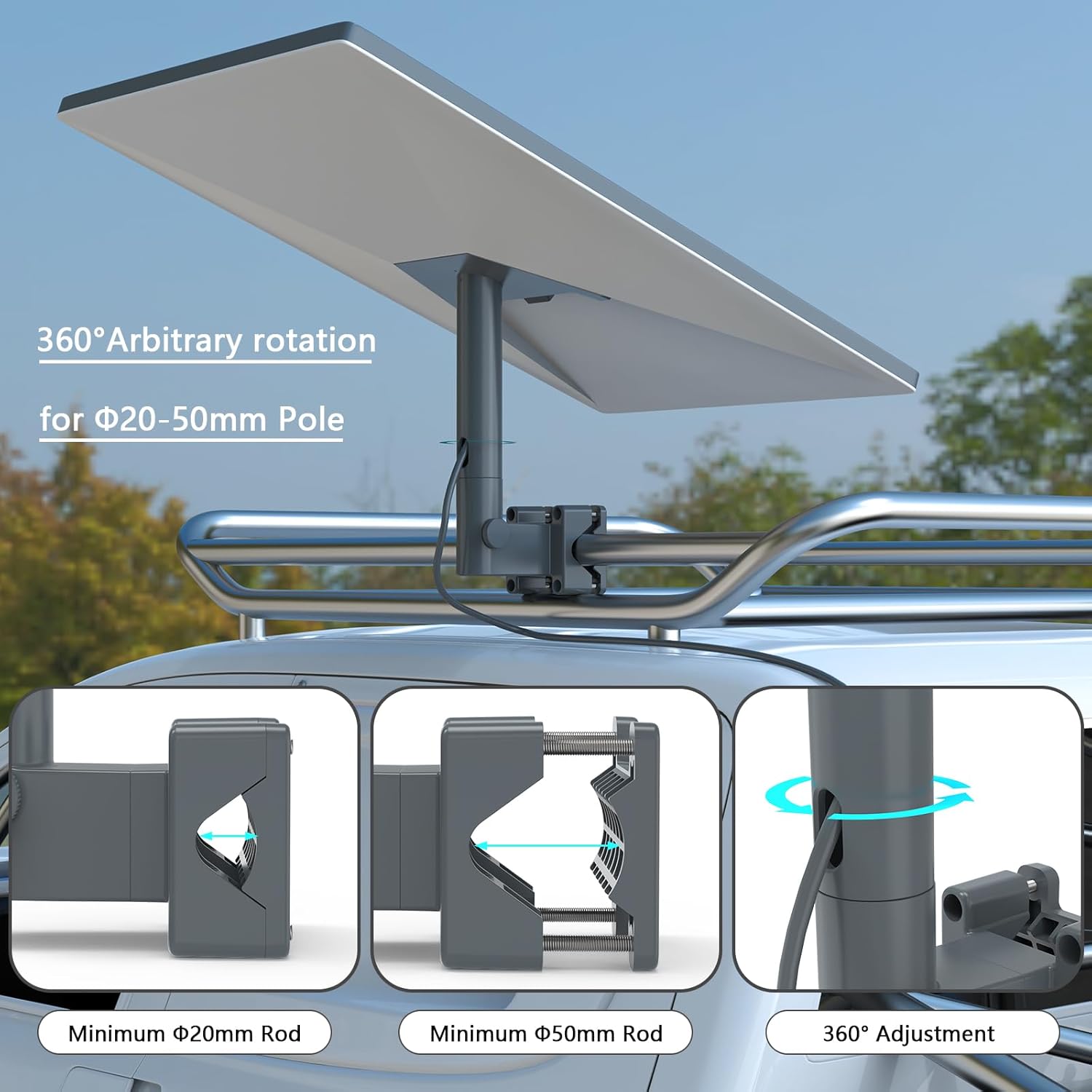
While Starlink doesn’t offer a fully mobile tripod for Gen 3 (yet), there are aftermarket solutions that customers have used successfully.
Here are some of the most mentioned products in the Starlink community:
1. SpaceTek Gen 3 V4 Standard Mobility Mount
- No-drill, modular design ideal for pop-up setups and campsites
- Highly portable with anti-theft screws and composite build
- Read more on SpaceTek’s official blog
2. SpaceTek Roof Rack Clamp Mount
- Designed for vehicle racks (flat or aero style)
- Low-profile, high-speed tested mount (up to 90 mph)
- Ideal for overlanders, tradesmen, and mobile technicians
- Full details from SpaceTek
3. APEX by Seaview Marine Mounts
- Aimed at marine and off-road users
- Compatible with cable sealing kits and rugged terrain mounting
- View launch article on OVRmag.com
✅ Disclaimer: We haven’t independently tested or reviewed these products. Our summaries are based on what customers have reported across trusted forums and manufacturer pages.
FAQ: Using Starlink Gen 3 Portably
Do I need a special Starlink plan for mobile use?
Yes. The Starlink Mobile Priority plan allows for in-motion and roaming use. Standard Residential plans may not work reliably on the move.
Can I use the Gen 3 Dish without permanently mounting it?
Yes. Many users are mounting their Gen 3 dish temporarily on stands, roof clamps, or custom-built poles. Just ensure the dish has clear sky access.
Is Starlink Gen 3 weather-resistant enough for portable use?
The dish is IP-rated and performs well in rain and snow, but ensure your mount is equally weather-ready if left outside.
Are there power requirements to be aware of?
Yes. The Gen 3 dish requires a constant 100W–150W draw, so if you’re off-grid, ensure your battery or inverter setup can handle it.
Will frequent movement affect signal quality?
Not if it’s securely mounted and aligned. Gen 3 auto-aligns on startup, but any movement (especially while driving) requires a proper mobility-approved mount.
Final Thoughts
The Starlink Gen 3 dish is no longer limited to fixed installations. Thanks to new mounts and FCC approval, mobile users are finally getting the tools they need to stay connected on the go. If you’re a vanlifer, tradesperson, or rural worker, you can now bring ultra-fast satellite broadband anywhere—just make sure your mount and service plan match your intended use.
Related Resources
- Starlink’s Official Store
- SpaceTek Gen 3 V4 Mount
- FCC In-Motion Approval News
- APEX Marine Mount Launch
How to Mount Starlink Gen 3 Mounting Kit
Related Posts
Power Solutions for Portable Starlink Gen 3
The Starlink Gen 3 dish and router consume around 100–150W under normal operation, which means you’ll need a reliable power source when operating away from mains electricity. For truly portable setups, your power choice can make or break the experience.
Power Consumption Breakdown
- Dishy (the antenna): 40–60W
- Router: 15–20W
- Power supply unit (PSU): 30–40W (efficiency losses)
Total: budget for 100–150W continuous draw, or 200W during boot-up.
Practical Power Options
Portable power stations (e.g., Jackery, Bluetti, Ecoflow) are the most reliable choice for camping and off-grid use. A 1000Wh capacity station will run your Gen 3 setup for 6–8 hours continuously. Look for models with AC output and at least 1500W inverter capacity.
Vehicle 12V systems work well if you’re stationary in an RV or van. Use a quality 150W DC-to-AC inverter, ideally hardwired to your vehicle battery with an inline fuse for safety. Never rely solely on a cigarette lighter socket—it cannot handle sustained 100W+ loads.
Solar panels extend runtime significantly. A 200W portable solar panel array paired with a 1000Wh power station will give you all-day operation in good sunlight. For permanent off-grid installations, add battery management and consider redundancy.
Mains AC power remains the simplest option at fixed locations (allotments, marquees, pop-up shops). Use a standard 3-pin plug with proper earthing and consider a surge protector.
Practical Tips
Run multiple power calculations before buying: a 500Wh power bank is barely enough for 3–4 hours. For weekend camping, 1000Wh is a reasonable baseline. Test your setup at home first—don’t discover power problems at your first remote site.
Keep cable lengths short and use high-quality connectors. Poor connections generate heat and voltage drop, which can degrade performance or trigger safety shutdowns.
In the UK, USB-C power banks cannot yet reliably power Gen 3 (PSU requirements are too high), so stick with AC inverter solutions. Battery-only schemes work best as supplements, not primaries.


