A password alone is no longer enough to protect your online accounts. Phishing attacks, data breaches, and credential stuffing mean that even a strong, unique password can end up in the wrong hands. A hardware security key like a YubiKey adds a second layer that cannot be stolen remotely — because it requires the physical device to be present.
This guide explains what a YubiKey is, how it works, which accounts it protects, and which model to buy.
What Is a YubiKey?
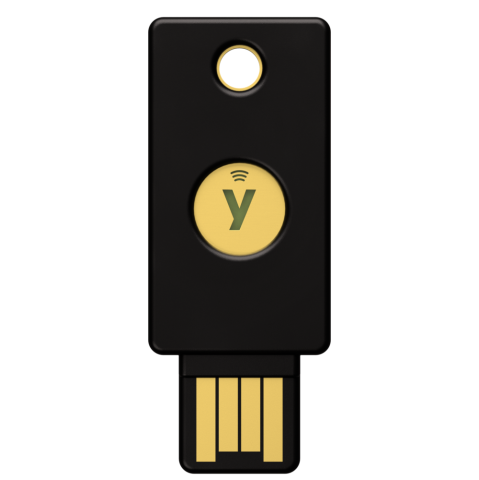
A YubiKey is a small USB or NFC device made by Yubico. When you log in to a supported account, you insert the YubiKey and tap it (or tap your phone to it via NFC) to confirm it is really you. Without the physical key, an attacker cannot access your account — even if they have your username and password.
Unlike SMS codes or authenticator apps, a YubiKey cannot be intercepted, SIM-swapped, or phished. It is the strongest form of two-factor authentication available to consumers.
How Does a YubiKey Work?
When you register a YubiKey with a service (Google, Microsoft, GitHub etc.), that service stores a cryptographic key tied to your specific device. When you log in:
- You enter your username and password as normal
- The site asks for your security key
- You insert the YubiKey into USB and tap the gold disc, or tap your phone against the key if using NFC
- The YubiKey signs a cryptographic challenge — proving it is the registered device
- You are logged in
This process takes about two seconds. The key never transmits your password or any reusable code — each login generates a unique cryptographic response that is useless to anyone who intercepts it.
What Can a YubiKey Protect?
YubiKeys work with hundreds of services. The most important ones to protect:
- Google / Gmail — full FIDO2 passkey support
- Microsoft 365 and Azure — essential for business accounts
- GitHub — critical for developers
- Dropbox, 1Password, Bitwarden, LastPass
- Facebook, Twitter/X, LinkedIn
- AWS, Cloudflare, and most major hosting platforms
- Windows login — YubiKey can replace your Windows password entirely
Check Yubico’s Works With catalogue for the full list — it includes over 1,000 services.
Which YubiKey Should You Buy?
Yubico makes several models. Here is how to choose:
- Yubico Security Key NFC (~£30) — Best value. USB-A + NFC. Covers FIDO2 and U2F. Fine for most people.
- YubiKey 5 NFC (~£50) — Adds OTP, PIV and OpenPGP support. Needed for advanced use cases and enterprise.
- YubiKey 5C NFC (~£55) — Same as above but USB-C. Best for modern laptops and MacBooks.
- YubiKey 5C Nano (~£60) — Tiny form factor, stays in your USB-C port permanently. No NFC.
- YubiKey 5Ci (~£65) — USB-C one end, Lightning the other. For iPhone users who want USB support too.
Our recommendation for most people: The Yubico Security Key NFC at ~£30. It covers all modern FIDO2/passkey logins and works over NFC with your phone. If you have a USB-C only laptop, get the Security Key C NFC instead.
Always buy two. Register a second YubiKey as a backup on every account. If you lose your primary key without a backup registered, account recovery can be a lengthy process.
How to Set Up a YubiKey (Step by Step)
The process is similar across most services:
- Go to your account’s Security Settings
- Find Two-Factor Authentication or Security Keys
- Select Add a security key
- Insert your YubiKey when prompted and tap the gold contact
- Give the key a name (e.g. “YubiKey Primary”)
- Repeat with your backup key and name it “YubiKey Backup”
For Google accounts specifically: go to myaccount.google.com → Security → 2-Step Verification → Add security key.
YubiKey vs Authenticator Apps vs SMS
- SMS codes: Weakest option. Vulnerable to SIM swapping and SS7 attacks. Better than nothing, but far from ideal.
- Authenticator apps (Google Authenticator, Authy): Much better than SMS. Can still be phished if you enter the code into a fake login page.
- YubiKey / hardware security key: Strongest option. Completely phishing-resistant. The key cryptographically verifies it is communicating with the real website — a fake phishing page will fail.
Frequently Asked Questions
What happens if I lose my YubiKey?
If you have a backup key registered, use that. If not, most services have an account recovery process using backup codes — make sure you save these when you set up 2FA. This is why registering two keys is essential.
Do YubiKeys work on phones?
Yes. YubiKey models with NFC work by tapping against an NFC-enabled Android or iPhone. On Android, NFC security key support is broad. On iPhone, FIDO2 NFC support is available on iOS 14.5 and above with supported browsers and apps.
Can a YubiKey be hacked?
Not remotely. The cryptographic keys stored inside the YubiKey cannot be extracted. An attacker would need your physical device. Combined with your password, this makes account compromise extremely difficult. There have been no known successful remote attacks on YubiKey devices in real-world use.
Is a YubiKey worth it for a home user?
Yes — particularly for your most important accounts: email, banking, cloud storage, and password manager. A compromised email account can unlock every other account through password reset flows. Protecting it with a hardware key is worth £30.